Showing posts with label Google. Show all posts
Showing posts with label Google. Show all posts
Thursday, 15 September 2011
How to Move Data from Google Apps to Google Account After Transition.
As Google is into transition of Google Apps to Google Accounts, there are few users who already have a personal account with the domain email address which they cannot continue to use as the email will be used by the organizational account. Such accounts are called conflicting accounts. If your organization has one or more such conflicting accounts, here is the way how users can move most of the application related user data to organizational account or another existing Google account.
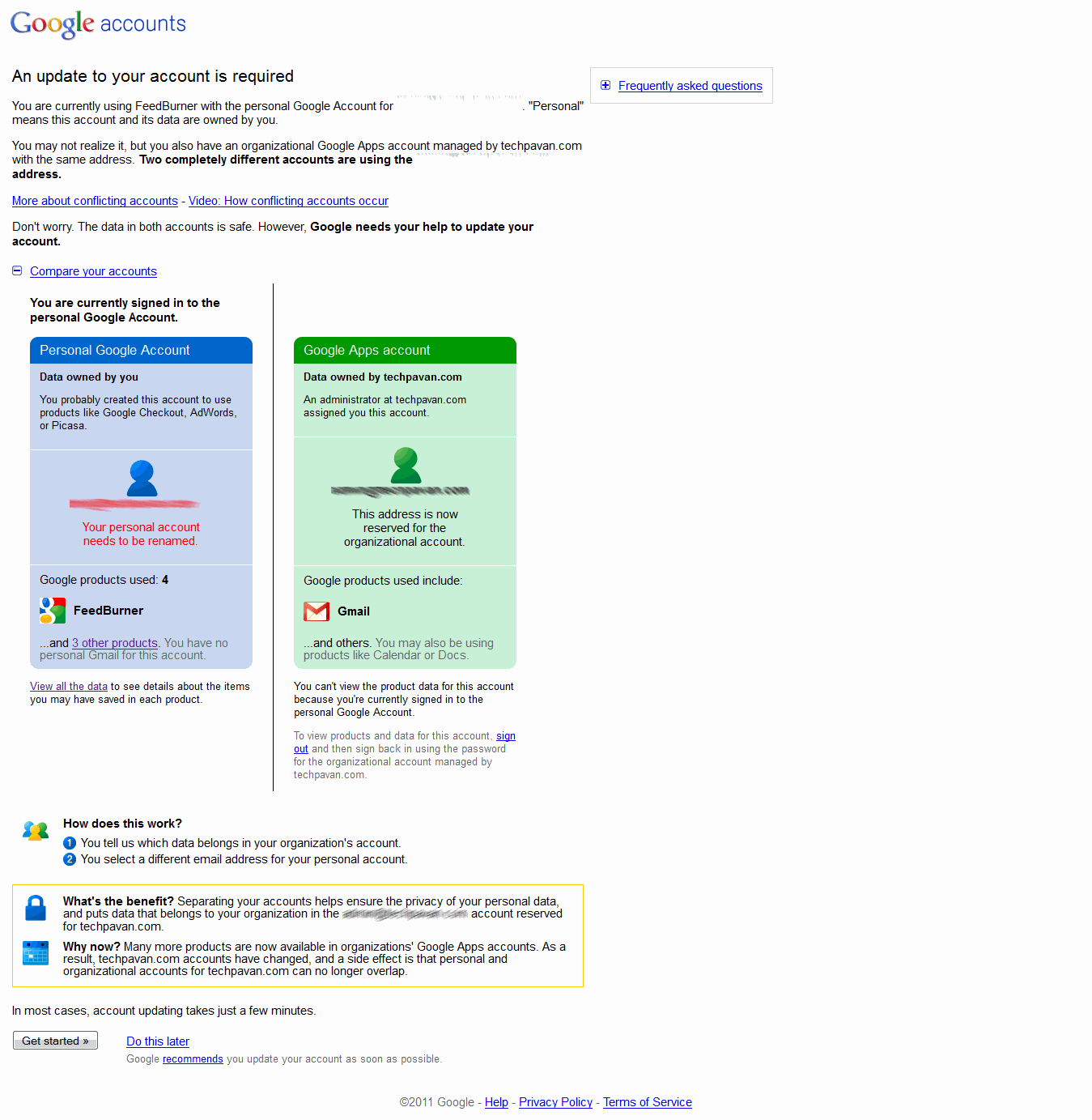
Once the user logs in to his conflicting account, he will be prompted about the account update by comparing both the accounts and the products associated with them. Click on get started will take to the options related with the update. (If you don’t get this prompt, you can alternately do that by clicking on move data on Google Dashboard). If you are stuck somewhere here, probably you have already tried data move and conflicting account has been renamed. In this case, your conflicting account email would beuser%example.com@gtempaccount.com if your domain email is user@example.com.
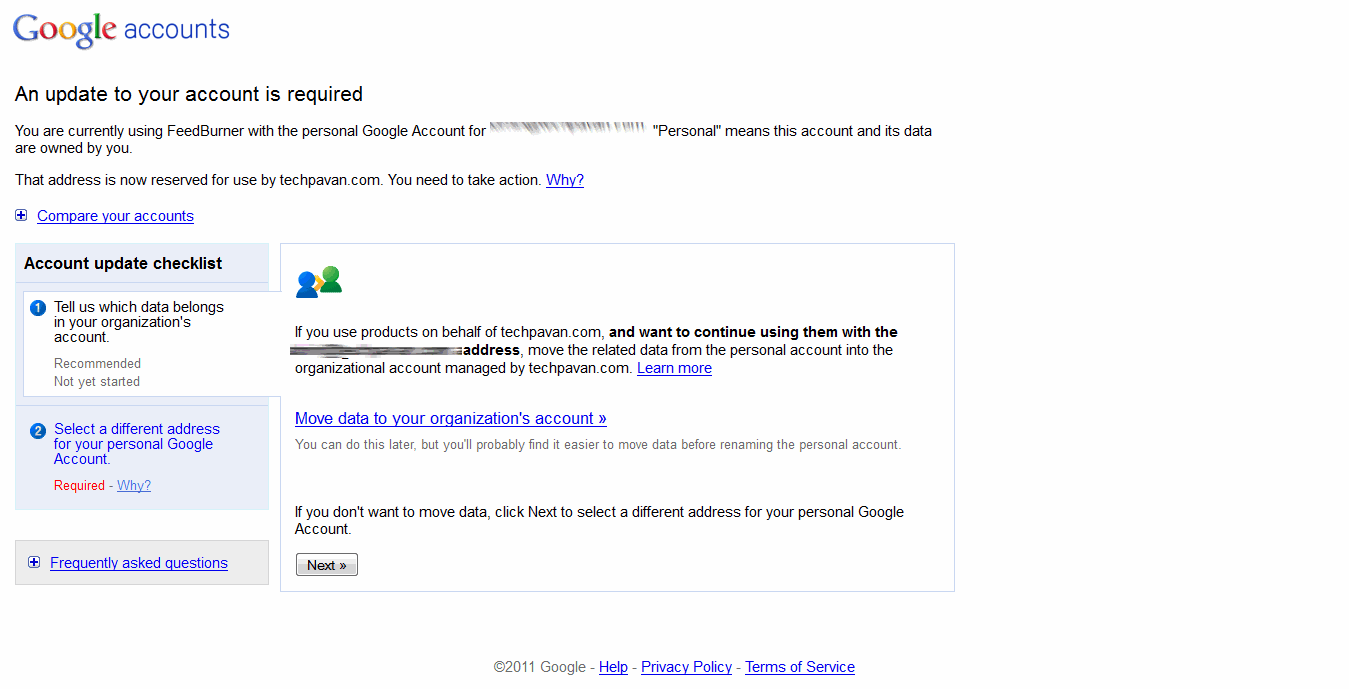
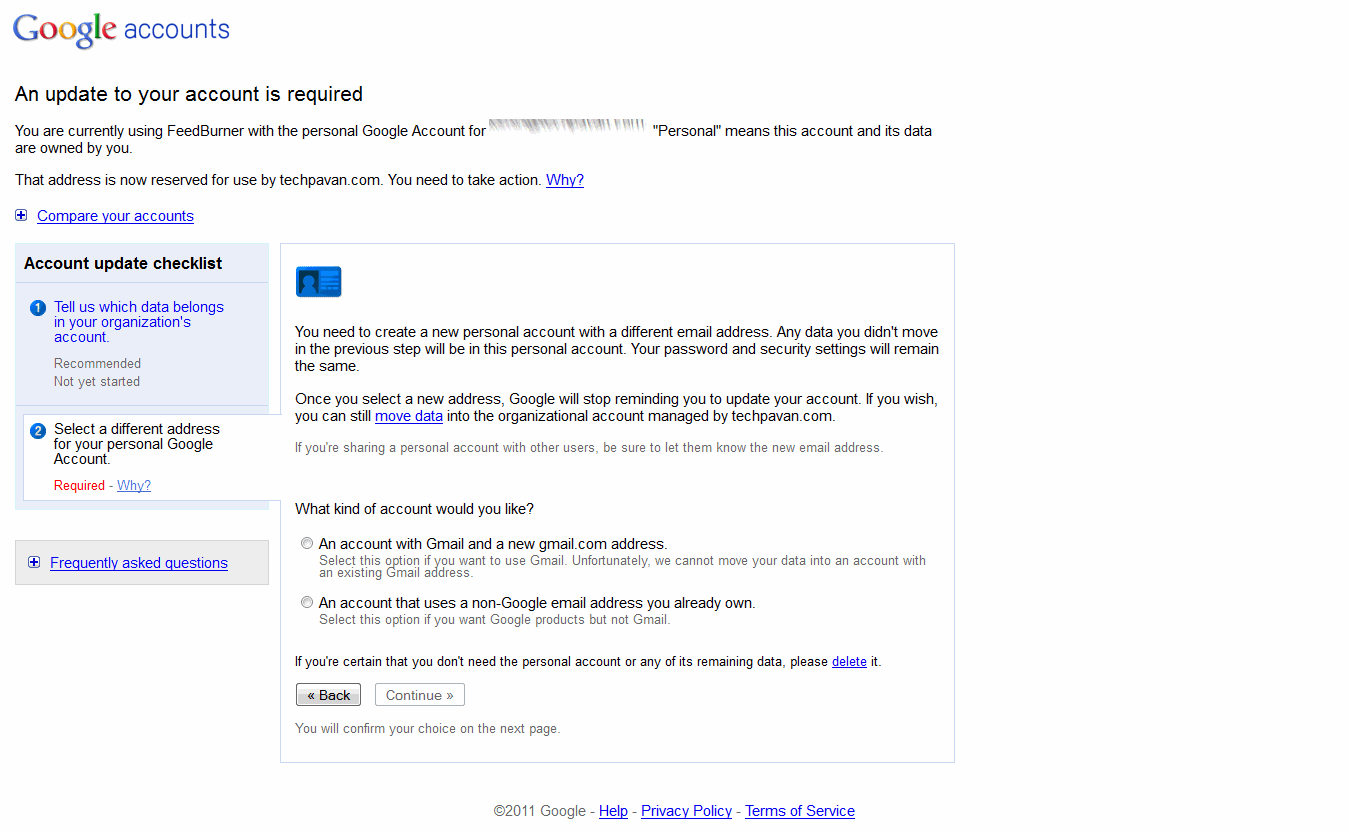
User can move the data to either the organizational or another personal account. The new personal account will be an existing Google account without gmail.com or a new Google account with gmail.com. The data cannot be moved to an existing gmail.com account. Next steps here demonstrate data move from personal to organizational account.
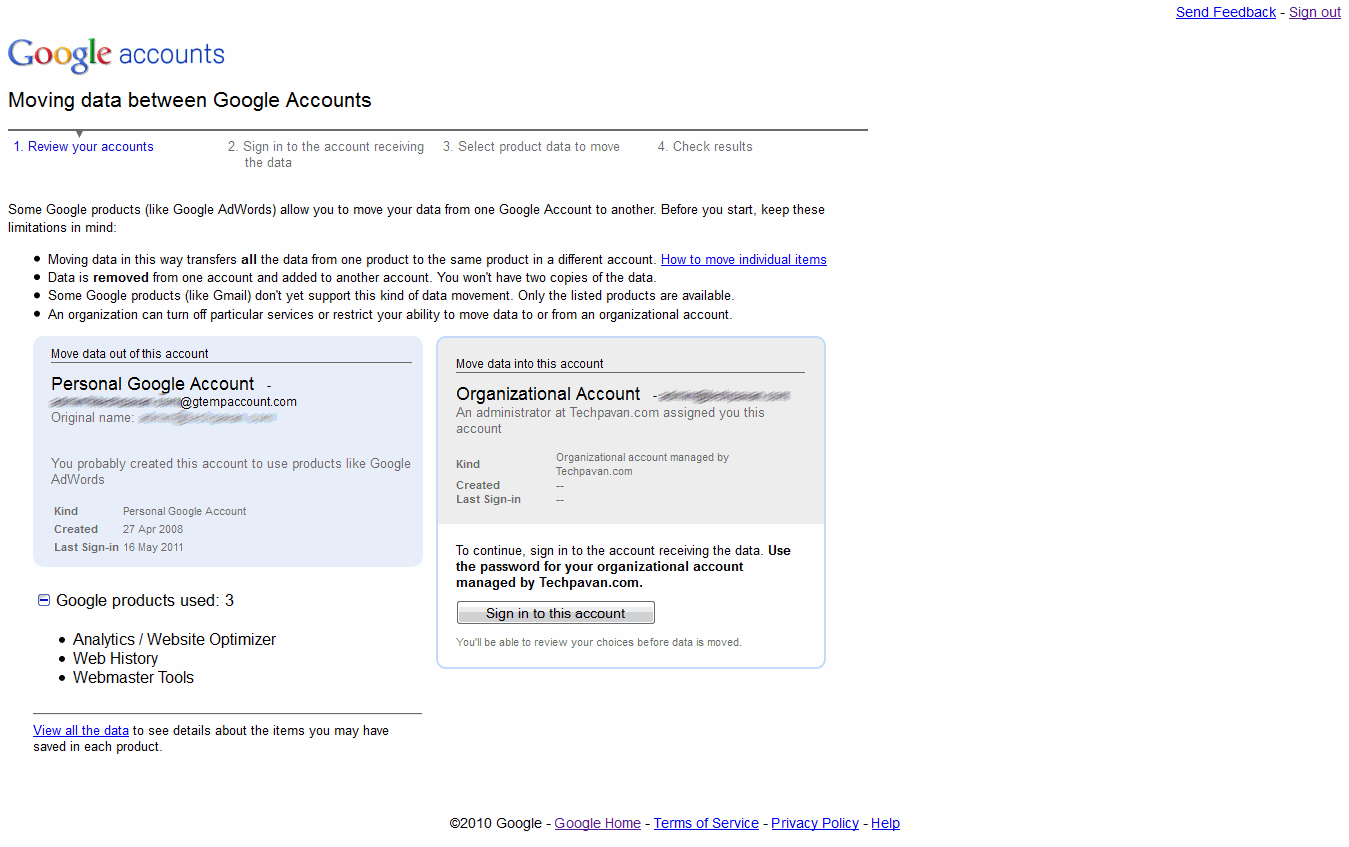
Next, a review about both the accounts will be displayed and you have to sign in to your organizational account. Click on sign in to this account on organizational account section and provide your current Google Apps credentials to sign in.
Check all the products you want to migrate and check the other declarations and move the data.
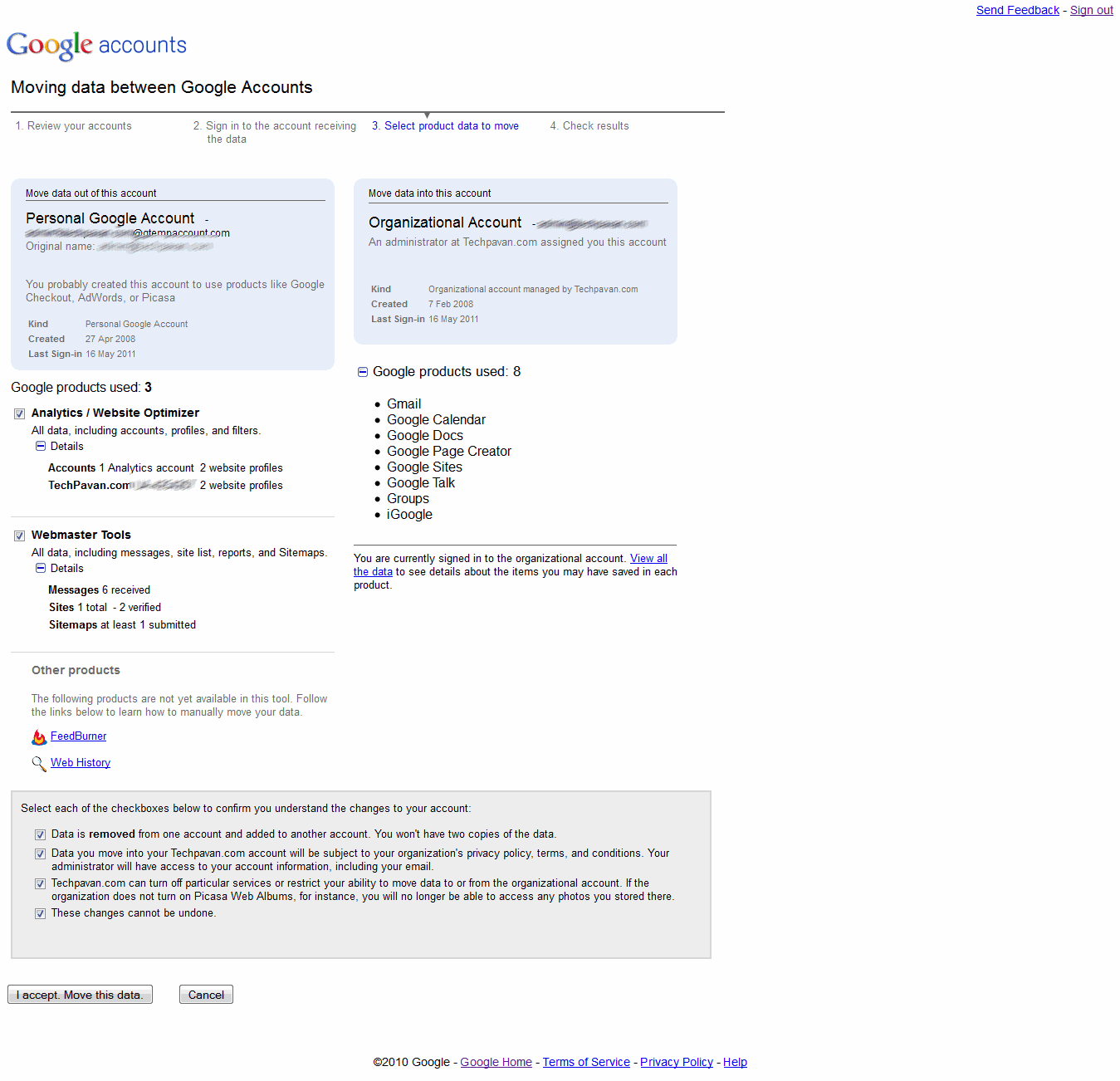
The data transfer tool does not support all Google applications. For unsupported applications, you can move the data manually.
Note: The data move process should be handled at the user level and admin will not have any privileges to move the user data. Admin will not even be aware of which users are having conflicts, but he will be notified about the number of users with conflicts during transition.
The video below can explain more on conflicting accounts.

Google TV: serious rivals and serious questions
 Curation has been the buzzword in broadcast platform circles for some time – the sheer amount of television channels is causing users enough problems, and when you factor in video on demand that becomes exponentially more difficult.Google TV's launch was beset by bluetooth problems - but with some serious rivals in the UK and many questions about how the hurdles between internet and television are cleared, those connection errors may not be the only troubles it faces.
Add in all of the video on demand and streaming content from the web and you realise that perhaps the only suitable way to deal with the information is with search – the tool that has made the internet accessible.
Obviously Google has a key advantage in this area, so I was intrigued to see exactly what Google TV could provide.
Cool concepts
Let's be frank – there was some wildly cool concepts on show; Google's app market is becoming as convergent as the company's plans and using Android as the base of Google TV may be a masterstroke, bringing apps that the public already understands.
Voice search, YouTube Leanback, being able to send a video from your mobile to your TV and vice versa, Google TV certainly has its highlights.
But, in light of many of the other TV innovators' early efforts this year, the same problems that have beset IPTV and bringing the web to the biggest screen in your living room, are still present and accounted for.
UK blessed
The UK is blessed with one of the most cutting-edge television markets. In the blue corner you have Sky, pushing 3D, a global leader in HD and a company that took PVRs and made them simple for the British consumer.
Over in the red corner is Virgin, a company with the flagship broadband product for the nation, an exciting future in partnership with TiVo and an already impressive on-demand service through cable.
And in the (possibly) neutral corner is the BBC, a globally unique setup that is publicly funded and involved in not only the likes of Freeview and Freesat, but also the big hope for UK IPTV – Project Canvas.
All three of these big hitters are developing IPTV-like solutions that bear comparison with Google TV – and all three have hit the same kind of problems.
Namely, how much of an internet experience actually works on a television set, and can you get a decent user experience with the wealth of video content already available on the web?
Less than standard
Let's start with the latter – a YouTube app is by no means a rare sight on the newest televisions, and although the latest material has a better chance of being in HD, the majority is certainly not of a particularly high standard.
On a computer screen that's not a massively big deal, but when your screen is a 1080p 42-inch Panasonic and you've got used to HD content, it certainly jars.
Google obviously acknowledged that YouTube in its online form is not suitable for televisions – hence the creation of YouTube Leanback, and it does have the power to make some web video significantly better in quality.
But as quality goes up, so does bandwidth, and unless the video site is set up for televisions then you need to either explain to consumers why their video is running in a box on the Amazon site, or find some way of adapting the player.
It's a tricky situation – and even in the Google TV demonstration, the simple way of switching between traditional TV and video on demand through a website that wasn't YouTube looked less than ideal.
Browsers
Browsers on televisions also cause a large number of arguments; many people, myself included, don't really object to a full browser experience – and the excellent Opera-based Wii browser or the competent PS3 have illustrated that, to some degree at least, this works.
But many people find them difficult and an old argument, often referred to as lean back versus lean forward, rears its head.
Essentially, we lean forward to use our computers and actively peer at what we are doing, built with a TV we lean back and let it wash over us. The argument is clearly reference in the latest YouTube announcement, but it remains at the heart of IPTV discussions.
Curation
And finally 'curation' - the horrible marketing term for just how we actually find the programmes that we want to watch among 500 television channels, thousands of hours of on-demand and the internet's practically endless archives.
Virgin Media's TiVo-powered interface will, almost certainly, use search as the central way of finding content – and, like Google TV, will offer paid for VOD, its own on-demand, linear channels and some internet video (TiVo taps into YouTube for example).
Subscribe to:
Posts (Atom)


